
CM Punjab Bike Portal Login
Students currently enrolled in HEC-recognized institutions are eligible to apply for the Punjab CM E-Bike Scheme. Punjab Chief Minister Maryam Nawaz has launched the online registration process for electric bikes, open to all students across the province. The deadline for online registration is October 4, 2026.
The government has announced that students who meet the eligibility criteria and register will be provided with an electric bike if selected through a lucky draw. If you wish to obtain an electric bike under this government scheme, you must first ensure you meet the eligibility requirements; this article outlines the entire process, from creating an account to submitting your online registration.
How to Apply for CM Punjab Scooty Scheme 2026
E Bike Account Creation Method 2026 For Students
To create an account for the E-Bike scheme, students must first visit the official website. They will then create an account by providing the following details:
- Candidate’s name
- Candidate’s email address
- Candidate’s ID card number
- Candidate’s gender
- Candidate’s province
- A strong password
- Captcha code
Finally, by clicking “Create Account” and entering the OTP, the account will be created.

What Happend After Creating The Account?
- Select Bike Colour Pink or Black and Select Margalla Electric 1000.
Applicant’s Personal Information
Applicants need to provide their basic personal information in the registration form. This information is used to identify the applicant and process the bike application.
- Applicant’s Name: Enter your full name as mentioned on your CNIC or B-Form.
- Applicant’s CNIC / Smart Card / B-Form Number: Enter your valid CNIC, Smart Card, or B-Form number.
- CNIC Issuance Date: Enter the date on which your CNIC was issued.
- CNIC Expiry Date: Enter the expiry date of your CNIC. If your CNIC is valid for a lifetime, select the Lifetime option.
- Father’s / Husband’s Name: Enter your father’s or husband’s full name.
- Father’s Alive Status: Select whether your father is alive.
- Gender: Select your gender.
- Date of Birth: Enter your date of birth exactly as mentioned on your CNIC.
- Contact Number: Provide an active mobile number that can be used for communication.
- Email Address: Enter your active email address.
Upload Applicant’s Picture
Applicants must upload a clear digital picture. The uploaded image should be clearly readable and meet the portal’s requirements.
Upload CNIC / B-Form Documents
Applicants are required to upload both sides of their valid identity document.
- CNIC / B-Form Front: Upload a clear image of the front side.
- CNIC / B-Form Back: Upload a clear image of the back side.
Current Residential Address
Applicants need to provide their current residential address. Enter the complete address, including:
- House Number
- Street Number
- Area
- City
- Tehsil
- District
You also need to select your Province, District, and City from the available options.
Permanent Residential Address
Applicants must provide their permanent residential address according to their CNIC or B-Form. Enter the complete address, including:
- House Number
- Street Number
- Area
- City
- Tehsil
- District
Applicants also need to select their Province, District, and City.
Bike Delivery City
Applicants must provide the name of the city where they want to receive the bike. Select or enter the appropriate city according to the options available on the registration portal.
Parent / Guarantor Details
The registration form requires applicants to provide details about their parent or guarantor. If the applicant is eligible to act as their own guarantor, they can select the “I am my own guarantor (Self Guarantor)” option where applicable.
- Relationship with Applicant: Select the relationship of the guarantor with the applicant.
- Guarantor Name: Enter the full name of the guarantor.
- Guarantor CNIC Number: Enter the guarantor’s valid CNIC number.
- CNIC Issuance Date: Enter the date on which the guarantor’s CNIC was issued.
- CNIC Expiry Date: Enter the CNIC expiry date. If the CNIC has lifetime validity, select the Lifetime option.
- Date of Birth: Enter the guarantor’s date of birth.
- Gender: Select the guarantor’s gender.
- Marital Status: Select the appropriate marital status.
- Number of Dependents: Select the number of people dependent on the guarantor.
- Contact Number: Provide the guarantor’s active mobile number.
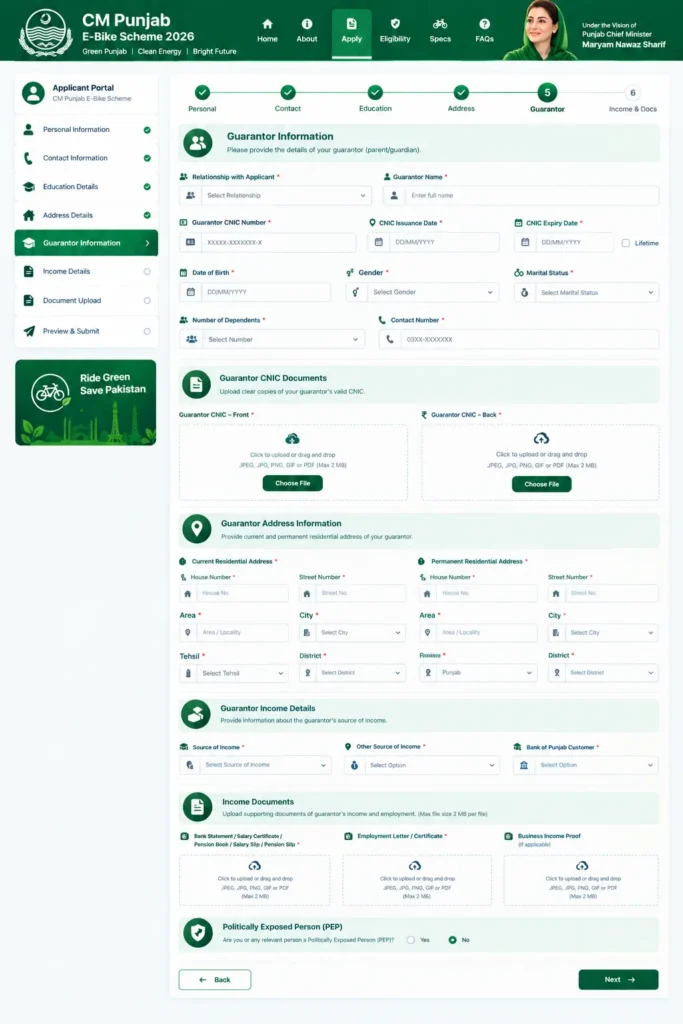
Guarantor CNIC Documents
The applicant must provide clear copies of the guarantor’s valid CNIC.
- Guarantor CNIC – Front: Upload a clear image or PDF of the front side of the guarantor’s CNIC.
- Guarantor CNIC – Back: Upload a clear image or PDF of the back side of the guarantor’s CNIC.
Guarantor Address Information
The form also requires the current and permanent residential address of the parent or guarantor.
Current Residential Address:
Enter the complete current address, including house number, street number, area, city, tehsil, and district. Applicants also need to select the relevant province, district, and city.
Permanent Residential Address:
Enter the permanent address according to the guarantor’s CNIC. The address should include the house number, street number, area, city, tehsil, and district, along with the relevant province, district, and city.
Guarantor Income Details
Applicants need to provide information about the guarantor’s source of income. This section helps provide financial information about the guarantor.
- Source of Income: Select the guarantor’s main source of income from the available options.
- Other Source of Income: Indicate whether the guarantor has any additional source of income.
- Bank of Punjab Customer: Select whether the guarantor is already a customer of the Bank of Punjab (BOP).
Income Documents
Applicants may need to upload documents supporting the guarantor’s income and employment information.
Bank Statement / Salary Certificate / Pension Book / Salary Slip / Pension Slip
Upload the relevant document showing the guarantor’s income. The portal specifies that the document should be no more than 60 days old.
Employment Letter / Employment Certificate
Upload an employment letter, employment certificate, or other valid documentary evidence issued by the employer.
Business Income Proof
If the guarantor earns income from a business, upload the required document that provides evidence of business income.
For the income documents, the portal allows JPEG, JPG, PNG, GIF, and PDF formats, with a maximum file size of 2 MB.
Politically Exposed Person (PEP)
The registration form also asks whether the applicant or relevant person is a Politically Exposed Person (PEP). Select the appropriate option according to the information requested on the registration portal.
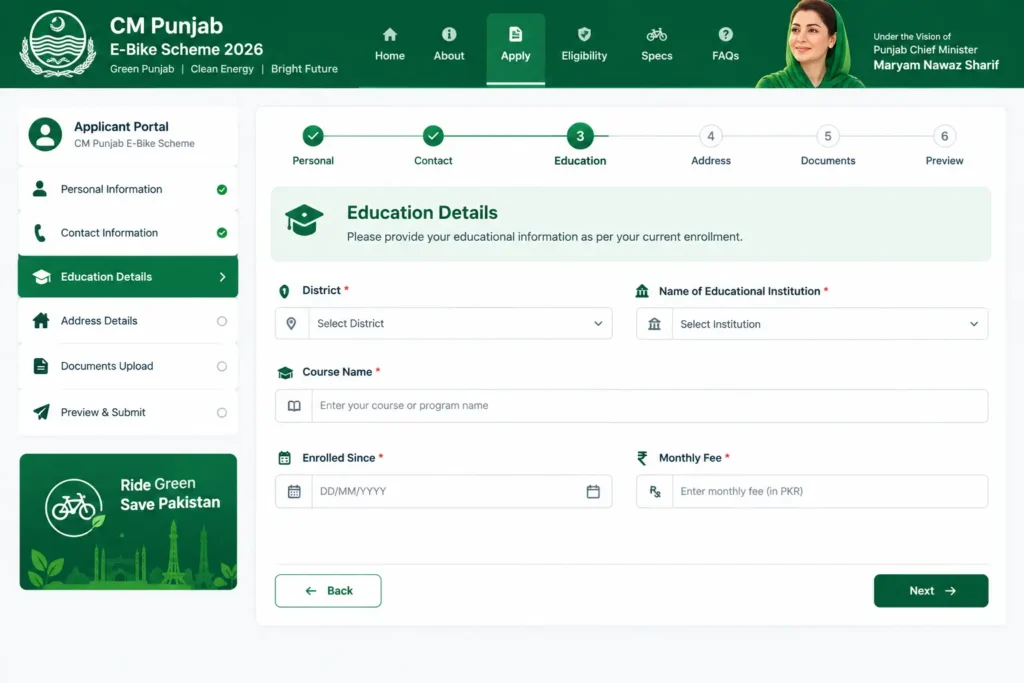
Educational Details
Applicants need to provide their current educational information in the registration form. This section helps verify the applicant’s enrollment and educational status.
- District: Select the district where your educational institution is located.
- Name of Educational Institution: Select your school, college, university, or other educational institution from the available list.
- Course Name: Enter the name of the course or program in which you are currently enrolled.
- Enrolled Since: Enter the date when you started your current course or program.
- Monthly Fee: Enter the monthly educational fee you currently pay to your institution.
Student Card / Bonafide Certificate
Applicants must upload a Student Card or Bonafide Certificate issued by their educational institution. The document should clearly show that the applicant is currently enrolled in the institution.
Paid Educational Fee Challan
Applicants also need to upload their paid educational fee challan as proof of their educational fee payment. Make sure the uploaded challan is clear and all relevant information is readable.
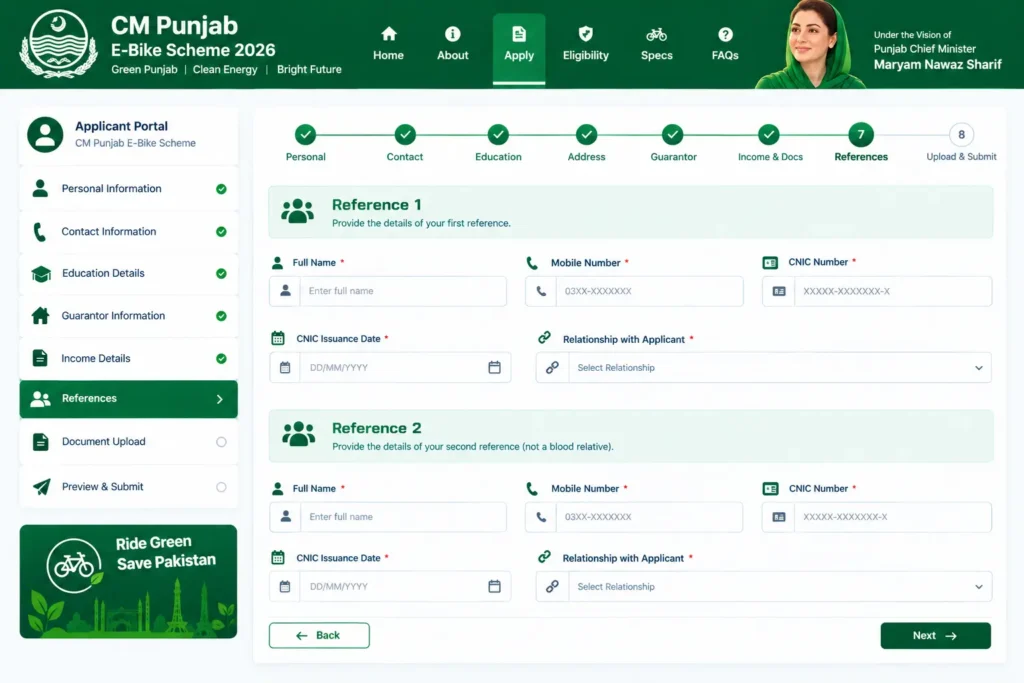
References Details
Applicants are required to provide details of two references who are not their blood relatives. These references may be contacted for verification purposes, so applicants should provide accurate and valid information.
Reference 1
Applicants need to provide the following information about their first reference:
- Full Name: Enter the complete name of the first reference.
- Mobile Number: Provide the active mobile number of the reference.
- CNIC Number: Enter the valid CNIC number of the reference.
- CNIC Issuance Date: Enter the date on which the reference’s CNIC was issued.
- Relationship with Applicant: Mention the relationship or connection between the applicant and the reference.
Reference 2
Applicants must also provide the details of a second reference who is not a blood relative.
- Full Name: Enter the complete name of the second reference.
- Mobile Number: Provide the active mobile number of the reference.
- CNIC Number: Enter the valid CNIC number of the reference.
- CNIC Issuance Date: Enter the CNIC issuance date.
- Relationship with Applicant: Enter the relationship or connection between the applicant and the second reference.
Important Point About References
Both references should be non-blood relatives, and applicants should make sure that the names, CNIC details, mobile numbers, and other information are entered correctly. Using accurate information can help avoid issues during the application verification process.
Declarations
I HAVE READ, UNDERSTOOD AND AGREE WITH ALL THE TERMS AND CONDITIONS.
Click on the box and submit the application.
Conclusion
The CM Punjab Bike Portal provides students with a convenient way to complete their bike scheme registration online. Applicants need to carefully enter their personal, guarantor, educational, address, and reference details and upload all required documents in the correct format. Before submitting the application, make sure that all information is accurate and that the uploaded documents are clear and readable.
After completing all sections, applicants should read and agree to the terms and conditions before submitting the application. Students should also keep their registration details safe for future updates. By following the complete registration process carefully, eligible students can successfully submit their application for the CM Punjab E-Bike Scheme.
CM Punjab E-Bike Scheme Application Last Date – Apply Now 2026